Client check-in software
that keeps every week in one queue
Client check-in software built for coaches: customizable questions, a per-client schedule, a review queue that shows what is pending first, photos and measurements on one screen, and AI review summaries you edit before they go out. Included in the base plan - not a paid add-on.
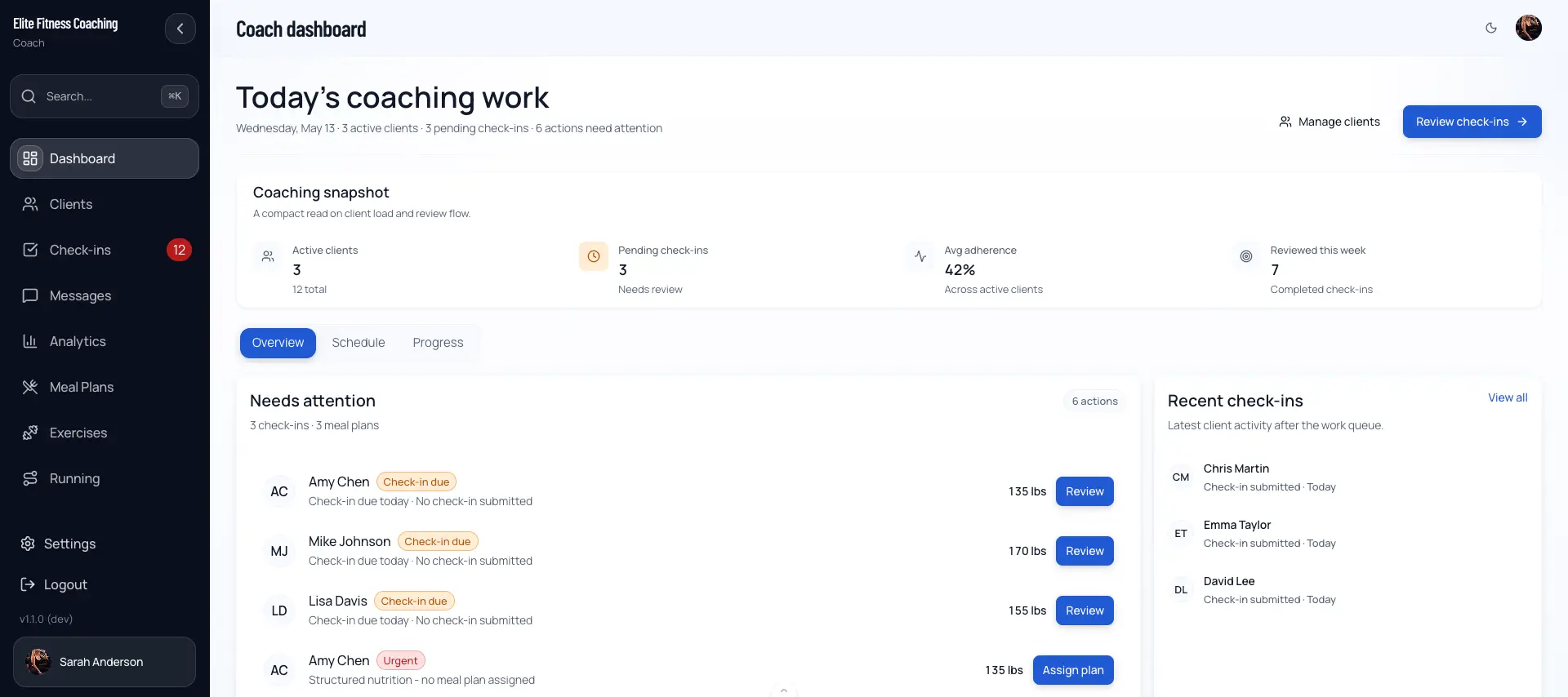
Check-ins that do not get lost
Most coaches start by asking clients to check in over text. It works until it does not: one client sends a paragraph, another sends a photo three days late, and by Sunday you are scrolling threads trying to remember who you still owe a reply. The data is there somewhere, but it is not in a form you can act on.
Structured check-in software fixes the shape of the problem. Each client answers the questions you configured, on the schedule you set, and the submission arrives as one report for the week. You open a review, read the week at a glance, look at the photos, check plan compliance, and send a response - with plan adjustments if the numbers call for them. The whole loop happens in one screen.
Because check-ins live in the same platform as training, nutrition, and daily logs, the review is not guesswork. It shows real adherence data, and your response can change the client's macro, step, or cardio targets on the spot. If you want the wider context, the all-in-one coaching platform page covers how the pieces fit together.
How a check-in moves through the platform
Five steps from the form you configure to the response the client reads.
Configure the check-in
Set the questions you want answered and choose which sections show in the review. Weight, photos, measurements, sleep, energy, adherence, custom questions - keep what you use, hide what you do not.
Client submits on schedule
Each client checks in on their own schedule. Their submission - numbers, photos, ratings, and notes - lands in your queue as a single report for the week.
Review from the queue
The Check-ins page opens on Submitted, so pending reviews are front and center. Open a card to read the week at a glance, plan compliance, feedback, and photos in one modal.
Adjust the plan inline
Change daily macros, step targets, or cardio directly in your response. Adjustments ship with the reply and take effect for the client immediately - no separate screen.
Send and move on
Hit Send response. The check-in moves to Reviewed, the client is notified, and your queue counts update. Your draft is safe if the network hiccups.
What the check-in tool gives you
Six things structured check-ins do that a chat thread cannot.
Customizable check-in questions
Build the check-in around your coaching. Ratings, status flags, free-text notes, and custom questions - only configured and answered fields appear in the review.
Per-client check-in schedules
Each client checks in on the schedule you set. Submissions arrive as one structured report per week instead of scattered messages.
Oldest-pending-first queue
The review queue opens on Submitted with Reviewed and All filters and a name search, so the check-ins waiting on you are the ones you see first.
Photos and measurements attached
Progress photos and body measurements come in with the same submission - the visual and the numbers side by side, not spread across two apps.
CoachGPT review summaries
Generate a structured draft from the submission: summary, recommended actions, adjustments, weekly focus, questions, and risks. Advisory only - you edit before sending.
Status tied to real submissions
A client shows as submitted only when they have actually checked in. The queue reflects real activity, so nothing slips because a note went stale.
Structured check-ins vs DMs and spreadsheets
Chat and spreadsheets both collect check-ins. Neither turns them into a queue you can clear or a plan you can change.
| What matters | DMs / texting | Spreadsheets | CoachingPortal |
|---|---|---|---|
| Where the update lives | Buried in a chat thread, easy to lose | A separate file the client has to open | One structured submission per week, in the queue |
| What you asked for | Whatever the client remembers to send | Fixed columns, hard to tailor per client | Questions you configured, per your defaults |
| Photos and numbers together | Photo in chat, numbers somewhere else | Numbers only; photos live elsewhere | Photos and measurements on the same review |
| Knowing what still needs a reply | Scroll and hope you did not miss one | Manual tracking column you keep updated | Submitted filter shows exactly what is pending |
| Acting on it | Copy targets into another tool by hand | No path to change the client plan | Adjust macros, steps, cardio inside the response |
A first-draft review, not a decision
The slowest part of a check-in is not reading it - it is writing the response. With CoachGPT enabled, a Generate recommendations button in the review reads the submission and drafts a structured take: a summary of the week, the factors that drove its read, recommended actions, training, cardio and macro adjustments, meal guidance, a weekly focus, questions to ask the client, and risks to flag.
Nothing is applied on its own. You choose Use as response draft to pull it into your reply, then edit it in your own voice before sending. It works from the same Plan Adherence evidence you see in the check-in, and when the data is thin it leans toward gathering more context rather than tightening the plan.
See the AI coaching assistantWhat a generated draft includes
- Summary of the week and what drove the read
- Recommended actions and a weekly focus
- Training, cardio, and macro adjustment suggestions
- Questions to ask the client
- Risks or flags worth surfacing
Advisory only. Every suggestion is a draft you review and edit before it reaches the client.
Who structured check-ins are for
If your check-ins have outgrown the chat thread, this is the point of switching.
Online coaches scaling a roster
Check-in forms for personal trainers stop the weekly review from turning into an inbox archaeology dig once you pass a handful of clients.
Coaches who tailor per client
Customizable questions and section visibility mean the accountability client and the competition prep client get different check-ins from the same tool.
Coaches who adjust plans weekly
When your response changes macros, steps, or cardio, doing it inside the check-in beats copying targets into a second app.
Check-ins pair naturally with the rest of the workflow - they feed coaching automation and sit alongside nutrition coaching software so a single review can touch training and diet at once.
Frequently asked
What is client check-in software?+
Client check-in software is the tool coaches use to collect a structured weekly report from each client and review it in one place. Instead of asking for updates over DMs, the client fills in a form you configured - weight, photos, measurements, adherence, energy, notes, and any custom questions - and the submission lands in a review queue. You read it, adjust the plan if needed, and send a response back. In CoachingPortal, every submission is tied to a real check-in the client completed, so the status you see reflects what actually happened, not a note you jotted somewhere.
Can I customize the check-in questions for each client?+
Yes. Check-in questions are customizable, and you control which sections appear in the review through a workspace-level default sections config. If you do not gather sleep data, hide that section. If you have added custom questions, they show up in their own section. Only configured and answered questions appear in the review, so you are not scrolling past empty fields. You set this once and it applies to every check-in going forward.
How does the review queue decide what to show me first?+
The Check-ins page opens on the Submitted filter - check-ins waiting for your review - so the work in front of you is the work that is actually pending. You can switch to Reviewed to see check-ins you have already responded to, or All to see both. A search box lets you jump to a specific client by name. Because status is tied to real submissions, a client only appears in Submitted once they have actually sent their check-in.
What does the AI check-in review actually do?+
If your workspace has CoachGPT enabled, a Generate recommendations button appears in the check-in review. It reads the submission and produces a structured draft: a summary of the week, the factors that most influenced its read, recommended actions, training and cardio and macro adjustments, meal guidance, a weekly focus, questions to ask the client, and any risks to flag. Nothing is applied automatically - you choose Use as response draft to pull it into your reply, then edit before sending. It is there to speed up the write-up, not to coach for you.
Can clients attach photos and measurements to a check-in?+
Yes. Progress photos the client uploads appear in the Photos section of the review, and body-weight and measurement data show up in the at-a-glance summary and plan-compliance rows. Everything the client reports for the week is collected in one submission, so you are not stitching together a photo from one app and numbers from a spreadsheet.
What happens after I send a response to a check-in?+
When you send, the message and any plan adjustments are saved to the check-in, the check-in moves from Submitted to Reviewed, the client gets a notification, and your queue counts update. If the send fails on a flaky connection, the modal stays open and your draft text is not lost. Once a check-in is reviewed, the original response is kept in the client history - you can append a new note, but you are not overwriting what you already sent.
Do I need separate software for training and nutrition, or is check-in included?+
Check-ins are part of the base product - not a separate add-on. The same platform holds the client’s training program, meal plan, daily logs, and messaging, so a check-in review can pull in real adherence data and you can adjust macros, steps, or cardio right from the response. See the full picture on the all-in-one coaching platform page.
Clear your check-in queue faster
Free for up to 3 clients with check-ins included. Paid plans from $19.99/month.